RAW vs JPEG: When to Shoot Each Format
Should you shoot RAW or JPEG? We explain the differences, advantages of each format, and when to use them for the best results.
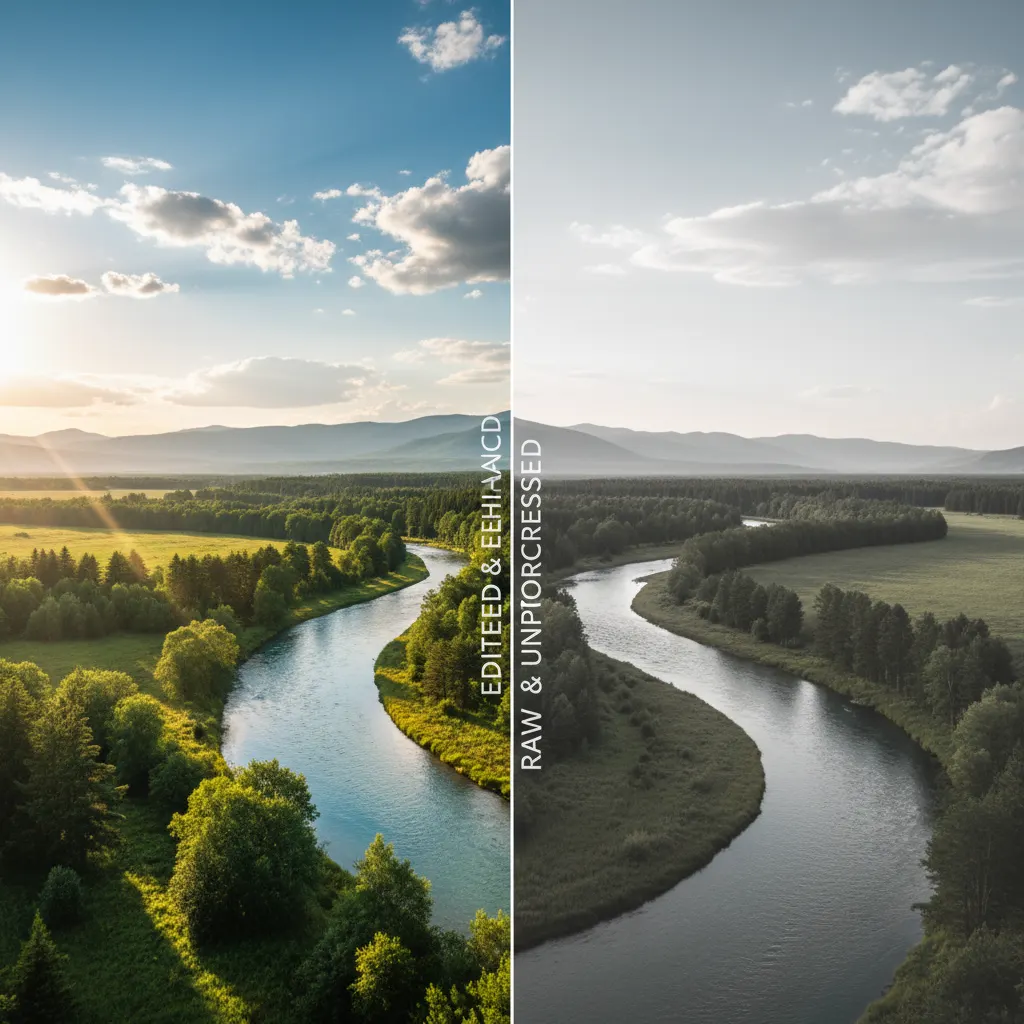
Every digital camera lets you choose between RAW and JPEG. For beginners, JPEG seems obvious — the files are smaller, they look good immediately, and they’re universally compatible. So why do most serious photographers shoot RAW?
The answer lies in flexibility.
What Is a RAW File?
A RAW file is the unprocessed data captured by your camera’s sensor. Think of it as a digital negative — it contains all the information the sensor recorded, but it hasn’t been interpreted yet.
RAW files:
- Contain 12-14 bits of color data per channel (vs 8 bits for JPEG)
- Preserve the full dynamic range captured by the sensor
- Are not compressed (or use lossless compression)
- Require processing software to view and edit (Lightroom, Capture One, DarkTable)
- Are specific to each camera manufacturer (.CR3 for Canon, .NEF for Nikon, .ARW for Sony)
What Is a JPEG File?
A JPEG is a processed, compressed image file. When you shoot JPEG, your camera takes the RAW sensor data and applies:
- White balance correction
- Color profile and saturation adjustments
- Sharpening
- Noise reduction
- Lossy compression to reduce file size
The result is a finished image that’s ready to share. But the original sensor data is discarded — you can’t get it back.
The Key Differences
Dynamic Range Recovery
This is the biggest practical advantage of RAW. A RAW file lets you recover 4-5 stops of shadow detail and 1-2 stops of highlight detail without visible quality loss.
With JPEG, attempting the same recovery produces banding, noise, and color shifts because the data simply isn’t there. Learning to read your histogram helps you nail the exposure in-camera and reduce reliance on recovery.
White Balance Flexibility
In RAW, white balance is a metadata tag — you can change it freely in post without any quality loss. Shot in tungsten light but forgot to change the setting? No problem.
With JPEG, white balance is baked in. You can adjust it, but it degrades the image.
Color Depth
RAW files contain billions of possible color values (14-bit). JPEG is limited to 16.7 million colors (8-bit). This means smoother gradients, more subtle tonal transitions, and less banding in RAW.
File Size
This is JPEG’s advantage. A typical comparison:
| Camera | RAW File | JPEG Fine | Difference |
|---|---|---|---|
| 24MP | ~25MB | ~8MB | 3x larger |
| 33MP | ~35MB | ~12MB | 3x larger |
| 45MP | ~50MB | ~15MB | 3.3x larger |
RAW files fill memory cards faster and require more storage space. Understanding how sensor size affects file sizes can help you plan your storage needs.
Processing Time
JPEGs are ready immediately. RAW files need to be processed — importing, adjusting, and exporting. For a professional shooting thousands of images, this workflow time is significant.
When to Shoot RAW
- Landscape photography — maximize dynamic range for high-contrast scenes
- Portrait photography — perfect skin tones and white balance in post
- Event and wedding photography — recover tricky mixed lighting
- Astrophotography — every bit of dynamic range matters
- Any situation with difficult lighting — backlit subjects, harsh shadows, mixed sources
- When you plan to edit extensively — the extra data gives you room to work
When to Shoot JPEG
- Social media sharing — if the image goes straight from camera to Instagram, JPEG is fine
- Sports journalism — deadlines demand fast delivery; JPEGs transmit faster
- High-volume events — when you’re shooting thousands of images and don’t have time to process each one
- Storage limitations — on a trip with limited memory cards
- When your camera’s JPEG engine is exceptional — Fujifilm’s film simulations, for example, produce JPEGs that many photographers prefer to their own RAW edits
The Best of Both Worlds: RAW + JPEG
Most cameras offer a RAW + JPEG mode that saves both files simultaneously. This gives you:
- An immediately usable JPEG for quick sharing
- A RAW file for any image you want to edit carefully later
The downside is doubled storage consumption. If your camera has dual card slots, you can save RAW to one card and JPEG to another.
Our Recommendation
Shoot RAW if you edit your photos. The flexibility is invaluable, and storage is cheap. Our photo editing basics with Lightroom guide will help you get started with RAW processing. Shoot JPEG if you don’t edit and your camera produces JPEGs you love. There’s no shame in it — especially with cameras like the Fujifilm X100VI where the in-camera processing is genuinely beautiful.
Shoot RAW + JPEG if you have the storage space and want maximum flexibility.
The format you choose matters less than getting out and shooting. Don’t let the RAW vs JPEG debate keep you from taking pictures.
You might also like
Camera Sensor Sizes Explained: Full-Frame, APS-C, and Micro Four Thirds
Understand how sensor size affects image quality, depth of field, and low-light performance. A complete guide to camera sensor formats.
The Exposure Triangle: Aperture, Shutter Speed, and ISO Explained
Master the three pillars of exposure. Learn how aperture, shutter speed, and ISO work together to control your camera and create better photos.
Best Cameras for Video and Content Creation in 2026
YouTube, TikTok, or client work — we review the best cameras for video content creators at every level and budget.